
Complete and send service reports from the job site
Your technicians fill in the service report on mobile, have the customer sign on screen, and the report is sent before they leave the site.

Demo examples: fictitious companies and data.
The roles this applies to
Lift, heating and refrigeration engineers, industrial maintenance, equipment after-sales service, tyre centres and workshops, fire safety, building maintenance.
Tracking work with paper documents
The technician fills in a paper form and takes photos on their phone. They hand everything in at the office at the end of the week, where someone re-enters the form, finds the photos and formats the report.
A piece of information is often missing: a meter reading, a part reference, the customer's signature. The customer receives their report several days later, and the manager catches up on paperwork at the weekend.
Collect and track job data with Tickee
Enter data on a smartphone or tablet
The technician scans the QR code or NFC tag on the equipment: the job opens with the right form. They fill it in step by step, add photos and have the customer sign on screen. In a basement or service duct with no network, everything is saved and sent as soon as the network returns.
Reports and tracking in the office
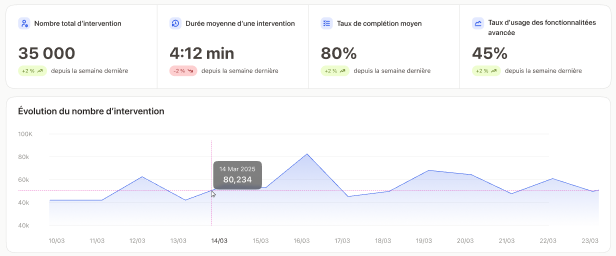
The PDF report, with your logo and your template, is ready as soon as the job is finished. Each job is linked to its equipment, which builds its history. Data is sent to your ERP or exported to Excel, and the dashboard shows activity in real time.
What actually changes with Tickee
The customer receives the signed report, with photos, on the day of the job.
The technician cannot finish while required information is missing: no report is sent incomplete.
The office no longer has to retype paper forms into the computer.
All technicians fill in the same form: you can compare results from one site to another.
Form examples
Related sector: Maintenance & technical services
Frequently asked questions
Yes. The PDF uses your logo and your layout.
The technician carries on as normal. Data is sent as soon as the phone finds a network again.
No, it connects to them. What is entered in the field arrives in your tools without being retyped.